
Web SDK overview
The Web SDK (npm package @deeprespond/im-web) adds IM to web pages: desktop browsers, H5 pages in mobile browsers and Electron apps. The SDK handles sign-in, the long-lived connection and reconnects, sending and receiving messages, conversation sync and local caching; you only display the data. It's written in TypeScript, ships its own type declarations and doesn't depend on any front-end framework. React and Vue have official bindings.
import { createDRClient } from '@deeprespond/im-web';

const im = createDRClient({ appKey: '1575529652#demo', apiUrl: 'https://im.example.com' });
await im.auth.loginWithTicket({ ticket });          // 已登录过的,创建后自动恢复,不必再登录
const list = im.conversations.list();               // 会话列表:先显示本地数据,后台同步
list.subscribe(() => render(list.getSnapshot().items));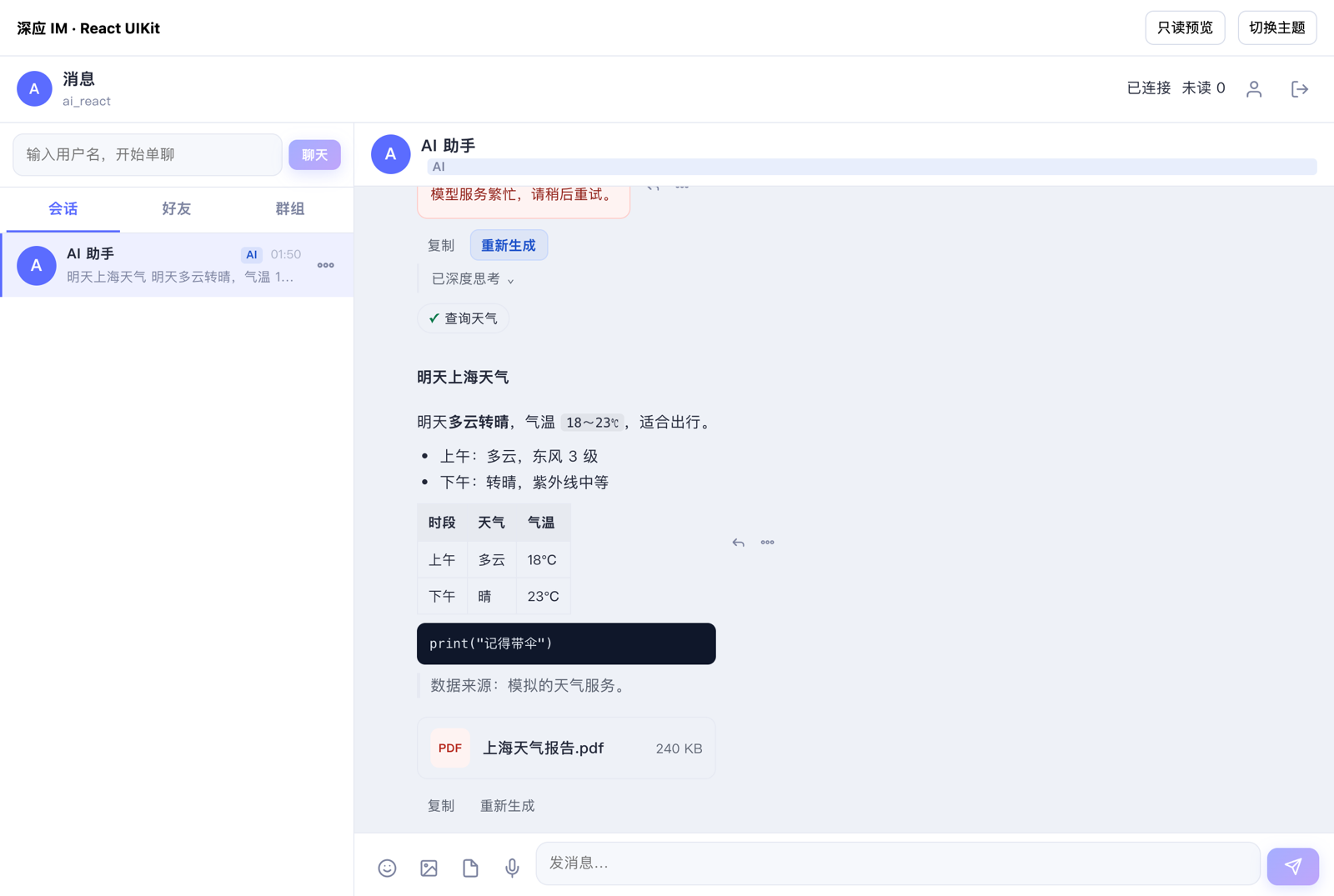
| Item | Details |
|---|---|
| Current version | 1.1.1 (Versions and support) |
| Install | npm install @deeprespond/im-web |
| Runs in | Chrome / Edge 100, Firefox 105, Safari 16.4, Electron 22 and later |
| Ready-made UI | React UIKit, Vue UIKit (React UIKit shown above) |
| Framework bindings | React and Vue |
What you can build
The client object im is split by feature:
| Property | Purpose | Docs |
|---|---|---|
im.auth, im.connection, im.config | Sign-in, sign-out and password changes; connection state and diagnostics; the app's runtime configuration | Initialization, sign-in and connection |
im.conversations | Conversation list, unread counts, pinning, drafts, typing indicators | Conversations |
im.messages | Message lists, sending, recalling, reactions, pinning, read receipts, local search | Messages |
im.users, im.friends, im.presence, im.devices | Your own and other users' profiles, friends and block list, presence, your signed-in devices | Users, friends and presence |
im.groups | Groups, members, join requests and invitations, invite links | Groups |
im.files | Uploads, downloads, group files, voice recording | Files |
im.chatrooms | Chat rooms | Chat rooms |
im.calls | One-to-one and group voice and video calls | Audio and video calls |
im.channels | Standalone RTC channels: join, resume, media, state and leave | Channels |
im.game | Game rooms: join, frame sync, custom messages, reconnection (from 1.1.0) | Game rooms · Web client |
im.ai | Live content of AI bot replies, stopping generation | AI replies |
im.push, im.reports | New-message alerts, push settings, muting conversations; reports | Alerts, push settings and reports |
im.on(), DRError | Events, errors and message text | Events and errors |
For your first integration, start with the Quickstart. To see it working first, download the demo page from the Demo guide. If you build with React or Vue, read Using React and Vue and try the runnable React / Vue project demos.
If you need a ready-made chat interface instead of copying whole pages from the demo, use React UIKit (@deeprespond/im-web-react-uikit) in React projects or Vue UIKit (@deeprespond/im-web-vue-uikit) in Vue 3 projects. Both provide conversation, chat, friend and group views plus composable components, released with the same version as the SDK.
Requirements
| Browser | Minimum version |
|---|---|
| Chrome, Edge | 100 |
| Firefox | 105 |
| Safari, iOS Safari | 16.4 |
| Electron | 22 |
Android WebViews follow the system Chrome version; in-app WebViews on iOS follow the system Safari version. The SDK relies on WebSocket, fetch, IndexedDB, Web Locks, BroadcastChannel and similar browser features. In a browser that lacks them, creating the client throws an unsupported error (details.missing lists what's missing); the SDK has no fallback mode.
- Use HTTPS: Web Locks and some other features are only available in secure contexts (HTTPS,
localhost, Electron's local pages). The SDK still works on HTTP pages, but coordination between tabs falls back to a less reliable method and a warning is printed to the console. See Multiple tabs. - Without IndexedDB (private mode in some browsers), the SDK keeps data in memory instead. Everything works, but data is reloaded from the server after a page refresh.
- Server-side rendering: you can import the SDK in server code of frameworks like Next.js and Nuxt (importing doesn't touch browser objects), but the client can only be created in the browser. See Using React and Vue.
- Electron: set
platformtowindows,macosorlinuxwhen creating the client, so that per-platform device limits count it as a computer rather than a web page. - Not for servers: to call IM from Node.js, use the server REST API. WeChat mini programs use the dedicated
/miniprogramsubpath or the prebuilt native package, see WeChat mini program SDK. UniApp H5 has a dedicated entry, see UniApp H5, with a complete runnable example in the Demo guide. UniApp Apps use native plugins, see UniApp SDK. React Native isn't available yet.
If the page has a Content Security Policy, connect-src must allow the IM service address (including wss://), your file storage and CDN, and the audio / video media service; img-src and media-src must allow your file storage and CDN; and worker-src must allow blob: (images are processed in a Worker before upload).
Install
Install with npm or pnpm:
npm install @deeprespond/im-web
# 或
pnpm add @deeprespond/im-web
The package ships ES modules only and works with Vite, webpack, Rollup and other bundlers. The React and Vue bindings are installed separately, see Using React and Vue.
Load with <script>
For pages without a build step, load dist/drim.min.js from the package directly (host it on your own server or CDN). It puts all SDK exports on the global DRIM:
<script src="/static/drim.min.js"></script>
<script>
  const im = DRIM.createDRClient({ appKey: '1575529652#demo', apiUrl: 'https://im.example.com' });
  im.on('connection.stateChanged', (state) => console.log('连接状态', state.kind));
</script>
DRIM only contains the main entry; the display helpers and Chinese message text described below aren't included. Use the npm package if you need them.
Calls with <script>: drim.min.js doesn't include the media components. On the first call it automatically loads livekit-client.umd.js from the same directory as drim.min.js, so the page doesn't need to include it. If you host the files yourself, put livekit-client.umd.js from the download package next to drim.min.js; otherwise calls are rejected with unsupported. With the npm package, the media components are installed with it and split by your bundler, so this step isn't needed.
<!-- 同一目录下还有下载包中的 livekit-client.umd.js -->
<script src="/static/drim/drim.min.js"></script>
Subpath exports
Besides the main entry, the package has two optional submodules that aren't bundled unless you import them:
| Import path | Contents |
|---|---|
@deeprespond/im-web/render | Display helpers: displayName (a user's display name: the first non-empty of friend remark, group nickname, nickname and username), conversationTitle (conversation title), summarize (the last-message summary in the conversation list), renderTip (group notice text), renderCallRecord (call record text), renderRecall (recall notice). See Messages |
@deeprespond/im-web/locale/zh-CN | Chinese message text: zhCN (the string table, which you can replace wholesale with another language) and describeError (message text for an error code). See Events and errors |
import { conversationTitle, summarize } from '@deeprespond/im-web/render';
import { describeError } from '@deeprespond/im-web/locale/zh-CN';
Core concepts
The client object
createDRClient() creates a client object (of type DRClient) shared by the whole page: a page can only have one client per AppKey at a time. Creating it sends no requests. If the user has signed in before in this browser, the SDK restores the session immediately and you don't need to sign in again. See Initialization, sign-in and connection.
Subscribable lists
Data that keeps changing, such as the conversation list, message lists, the friend list and group members, comes as subscribable objects (LiveList, or MessageList for messages):
const list = im.conversations.list();
const off = list.subscribe(() => {
  const { items, loading, hasMore } = list.getSnapshot();
  render(items, loading, hasMore);
});
// 不再显示时
off();
list.dispose();getSnapshot()returns the current snapshot. It returns the same object until something changes; then it returns a new snapshot in which unchanged items are still the original objects, so your UI can compare by reference to decide which rows to re-render.- Snapshots and their data are frozen. Keep any UI state you want to attach elsewhere.
subscribe(listener)callslistener(with no arguments) when the snapshot changes and returns an unsubscribe function. Several changes in the same event loop turn produce one notification.getSnapshotandsubscribeare bound to their object, so you can pass them on their own, as in React'suseSyncExternalStore(list.subscribe, list.getSnapshot).- Call
dispose()when the list is no longer shown. On sign-out or when switching users, the SDK clears the snapshots, notifies once, then disposes every list.
Single values such as sign-in state, connection state and the total unread count can be read synchronously (for example im.auth.state and im.conversations.getUnreadTotal()) and emit the matching events when they change.
Local first, synced in the background
Conversations, messages, friends, groups and other data are stored in the browser's IndexedDB, and what you read is always local data: after a refresh the page shows the previous content immediately without waiting for the network. The SDK keeps the connection open and syncs changes in the background, writing them locally before notifying you. Messages sent while offline go into a send queue and are sent automatically once the network is back.
Multiple tabs share one connection
When several tabs are open in the same browser, they share one device ID, one sign-in and one long-lived connection. One tab is the primary tab and handles the connection, sync and sending; the others read the same local data, and the SDK forwards operations that need the server to the primary tab. Each tab still creates its own client and calls the same methods; the coordination is invisible to you. Signing in or out in one tab signs the other tabs in or out too. See Multiple tabs in one browser.
How it works with your server
The Web SDK only calls the IM service's client APIs; your own server vouches for who the user is:
- Your server calls the IM REST API with an App Token to create an IM account for the user, and after the user signs in to your system, issues a sign-in ticket for them.
- The web page gets the ticket from your server and passes it to the SDK to sign in to IM.
- From then on, the SDK talks to the IM service directly to send and receive messages and sync conversations.
The App Token and Client Secret are server credentials and must never appear in a web page. The AppKey (org_name#app_name) is the app's public identifier and can be included in pages; find it in the app details in the console.
Messages, conversations, groups and other objects returned by the Web SDK have the same fields as in the server REST API (such as client_msg_id and unread_count), so you can use the server docs as a reference.
Standalone RTC channels
im.channels handles audio and video channels for meetings, voice rooms and other uses without a group. See Channels for the API, media permissions and page cleanup, and Versions and support for platform support.
Languages and preferences
Simplified Chinese, Traditional Chinese and English are supported. The page language is chosen from, in order, the lang URL parameter, the choice saved on this device, the account preference and the browser language. The host app picks the SDK's message-text directory; user messages are never translated. For the account language API, request headers, notification templates and SDK examples, see Languages and localization.