
Game rooms overview
Game rooms give multiplayer online games a real-time match channel. Your server creates a room and issues join tickets to players; players connect with the client SDK to the nearest game node and exchange inputs and frames; when the match ends, your server receives a callback with the result and each player's online time. A room holds up to 10 players, which suits versus, competitive and party games with small rooms.
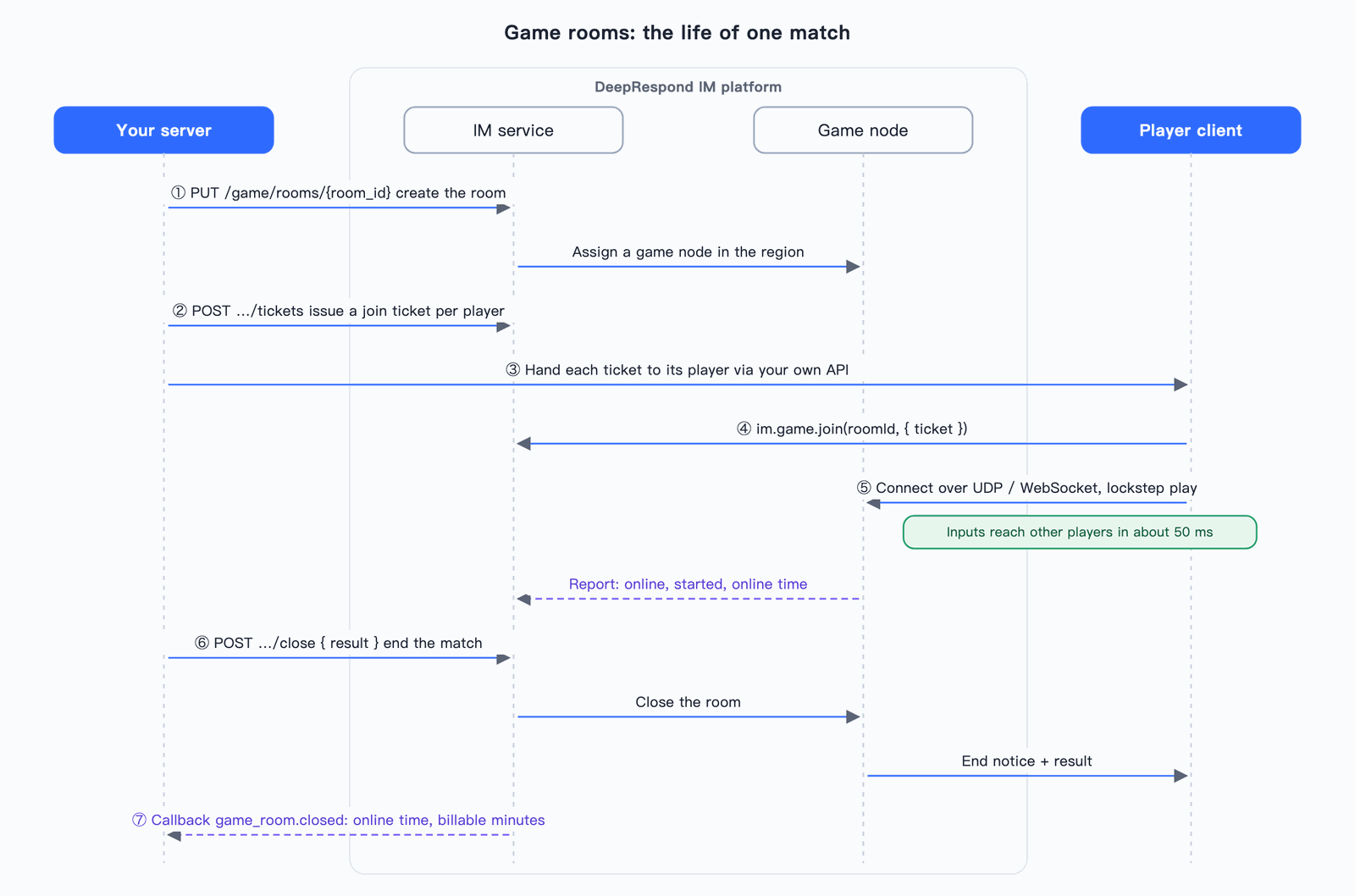
A match from creating the room to the end:
# 1. 你的服务端:匹配成功后建房,房间 ID 用你自己的对局 ID
curl -X PUT "$IM_API/$ORG/$APP/game/rooms/rank-8812" \
  -H "Authorization: Bearer $APP_TOKEN" -H "Content-Type: application/json" \
  -d '{"max_players":2,"start_mode":"all_ready","tick_rate":30}'

# 2. 你的服务端:给两个玩家签发加入票据,经你的业务接口分别交给他们
curl -X POST "$IM_API/$ORG/$APP/game/rooms/rank-8812/tickets" \
  -H "Authorization: Bearer $APP_TOKEN" -H "Content-Type: application/json" \
  -d '{"users":[{"username":"alice"},{"username":"bob"}]}'

# 3. 玩家的客户端:登录 IM 后 im.game.join('rank-8812', { ticket }) 加入,准备、对战

# 4. 你的服务端:对局结束时带上结算结果结束房间,随后收到 game_room.closed 回调
curl -X POST "$IM_API/$ORG/$APP/game/rooms/rank-8812/close" \
  -H "Authorization: Bearer $APP_TOKEN" -H "Content-Type: application/json" \
  -d '{"reason":"对局结束","result":{"winner":"alice"}}'
The complete runnable steps are in the quick start.
| To do this | See |
|---|---|
| Run your first match | Quick start |
| Create rooms, issue tickets, start, end, remove players | Server API |
| Receive room creation, player join/leave and match end | Callback events |
| Let players join and play in a web page or Cocos (web platform) | Web client |
| Let players join and play in a Unity game (iOS, Android, PC) | Unity client |
| Build your own client for an engine without an SDK (Godot, Unreal, native apps and so on) | Transport protocol |
| Enable the feature in the console, view rooms and usage, understand billing and limits | Console, billing and limits |
Who does what
| Role | Does | With |
|---|---|---|
| Your server | Matchmaking, creating rooms, issuing join tickets, deciding the winner, ending rooms, removing cheaters | The server API (App Token) or the game module of a server SDK |
| The player's game client | Joins the room, gets ready, sends inputs every frame, advances the game frame by frame | The client SDK (Web and Unity are available; other engines can implement the transport protocol themselves; see platform support) |
| Game nodes (provided by the platform) | Collect every seat's input and broadcast it at a fixed frame rate; reconnection, frame catch-up, snapshots | Nothing to deploy |
| IM (provided by the platform) | Validates tickets, assigns seats, schedules nodes, counts online time, sends callbacks | Nothing to deploy |
Your game's rules, graphics and win conditions live in your client and server. Game nodes only relay data and do not understand your game.
Requirements
- The platform has opened game rooms and has not disabled them for your app;
- Your app's plan includes "Game rooms";
- The app is in a normal state;
- At least one region is available (it has game nodes that can take rooms).
The "Game rooms" page of your app in the console shows whether these are met and what is missing, see console.
Basic concepts
Room: your server creates it with its own room ID (1–64 letters, digits, _, -), usually the match ID. Creating the same ID with the same parameters again returns the same room, so a matchmaking service that retries after a timeout never creates two rooms. Once a room has ended its ID cannot be reused.
Seat: every room has max_players seats (1–10), numbered from 0. You can pin a seat when issuing a ticket; otherwise the player gets the lowest free seat when joining.
Join ticket: a one-time credential your server issues for one user and hands to that user. It is valid for 120 seconds by default (30–600). Issuing again for the same user revokes their unused ticket. Rooms with access_mode open need no ticket: any signed-in user of the app can join.
Sync mode:
sync_mode | Good for | What the node does |
|---|---|---|
frame (default) | Action, fighting, MOBA and other games where everyone must see the same state | Runs tick_rate frames per second (10, 15, 20, 30, 60; default 30). Every frame it bundles all seats' inputs for that frame and broadcasts them; clients advance the same logic frame by frame |
relay | Card and board games, turn-based and party mini games | Does not run frames; only relays custom messages between players |
Start mode:
start_mode | When the match starts |
|---|---|
auto (default) | As soon as the first player connects to the game node |
all_ready | When every connected player who has not left has called ready(). It does not wait for all seats to be filled: do not let players get ready before everyone has arrived |
manual | When your server calls the start API |
Reconnection: a player who drops and comes back within reconnect_window_seconds (default 60, 0–300) returns to the same seat and missing frames are filled in automatically; after the window the player counts as having left. The SDK reconnects automatically; you write no code for it.
Room status
status | Meaning |
|---|---|
open | Created and waiting to start; players can join |
playing | In a match; players can still join free seats |
closing | Ending: the game node has been told and players receive the end notice |
closed | Ended; close_reason says why |
Rooms end automatically in these cases, without you calling anything:
close_reason | When |
|---|---|
closed_by_server | Your server called the end API |
closed_by_console | Ended in the console |
closed_by_platform | Ended by platform operations |
expired | Exceeded max_duration_seconds (default 3600 seconds) |
empty | All players left or dropped, and 60 seconds passed after the reconnect window |
node_lost | The game node failed and lost contact |
node_draining | The game node went down for maintenance |
Whatever the reason, a game_room.closed callback is sent when a room ends.
Platform support
| Platform | Status |
|---|---|
Web (TypeScript, @deeprespond/im-web 1.1.0 and later, with React and Vue bindings) | Available, see Web client. Browsers use WebSocket |
| Cocos Creator (web platform) | Uses the Web SDK |
Unity (C#, iOS / Android / PC, cn.deeprespond.im.game 1.0.0) | Available, see Unity client. Uses UDP first and switches to WebSocket when it can't connect |
| WeChat mini games | In development |
| Native Android, iOS, Flutter | Planned |
| Server SDKs: Go, Node.js, Python, Java | game module available, see server API |
| Other engines and languages (Godot, Unreal, native apps and so on) | Build your own client over WebSocket following the transport protocol |