
Send your first message
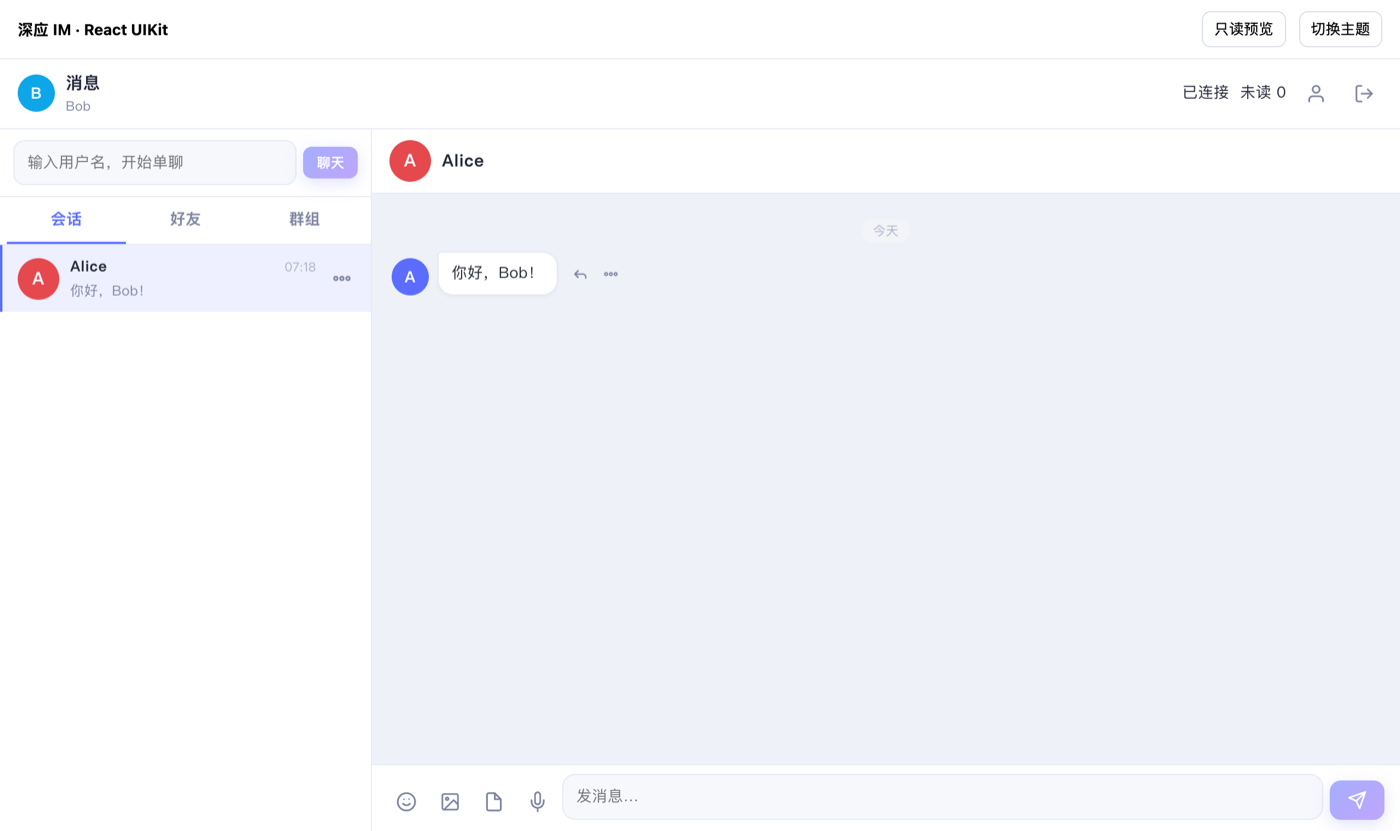
In 10 minutes and with nothing but curl, go from signing up to bob seeing alice's message in a web page:
| What you'll do | API |
|---|---|
| Get your app's access credentials | Console "Overview" |
| Exchange them for an App Token | POST /{org}/{app}/token |
| Create the users alice and bob | POST /{org}/{app}/users |
| Send a message to bob as alice | POST /{org}/{app}/messages |
| Check bob's conversations and unread count | GET /{org}/{app}/users/bob/conversations |
You need an email address or phone number (to sign up for the console) and a terminal with curl.
Step 1: Sign up and get your credentials
Open the console and sign up with your email or phone number (see the Console guide). Signing up creates your tenant and an app named demo, and opens its "Overview". "Access credentials" holds everything you need below:
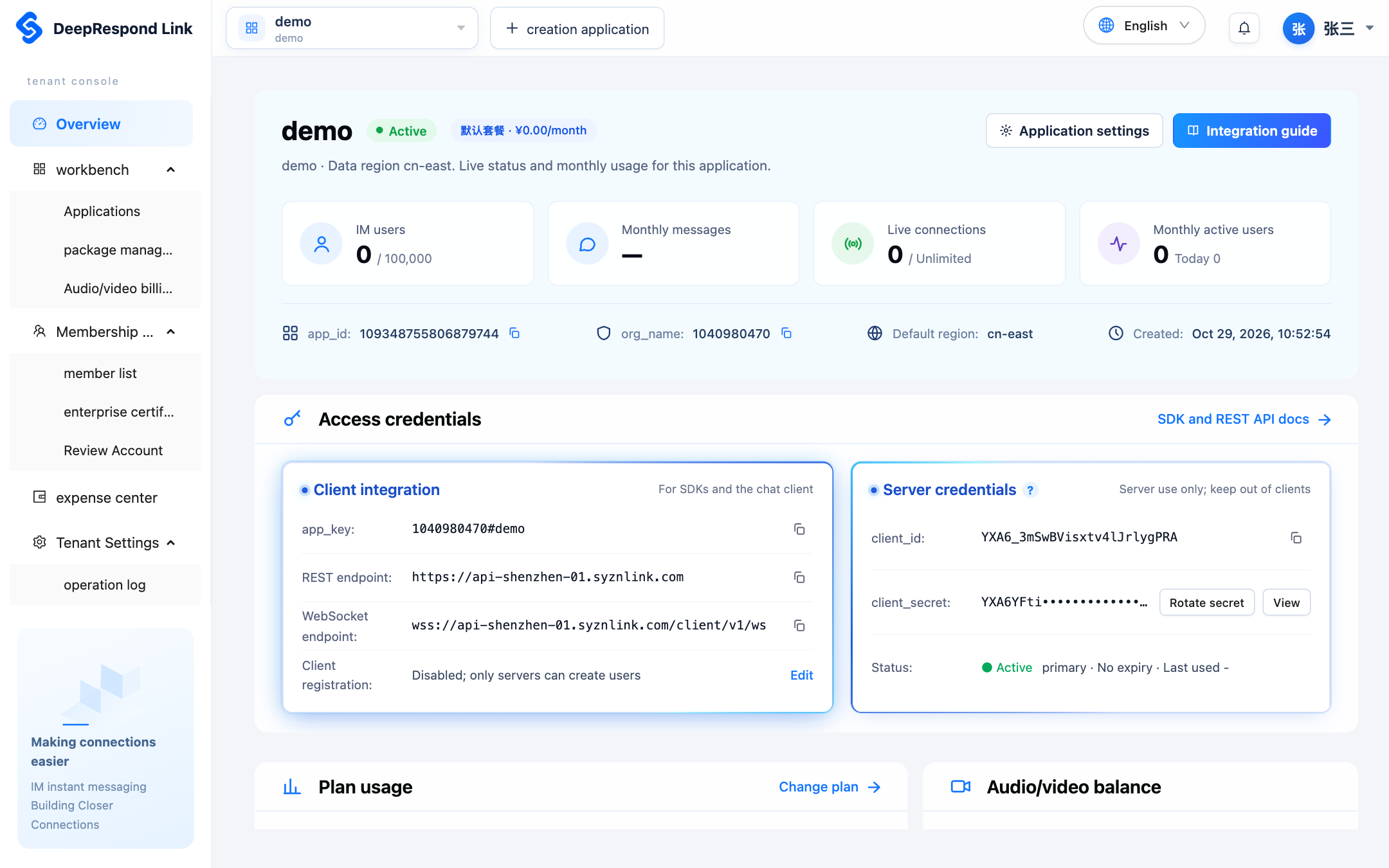
| Item | Example | Used for |
|---|---|---|
app_key | 1100250925#demo | Client sign-in; org_name before the #, app_name after it |
| REST endpoint | https://api.example.com | The address of every API |
client_id | YXA6MVMEOd4c… | Getting an App Token |
client_secret | Click "View" and re-verify your identity | Getting an App Token; keep it on your server |
Keep test and production apart
Use one app for testing and another for production: click "Create app" at the top of the console (see Create an app) and use its credentials in the variables below.
Step 2: Set environment variables
export IM_API="https://api.example.com"   # 概览中的 REST 接入地址
export ORG="1100250925"                   # 你的 org_name
export APP="demo"                         # 你的 app_name
export CLIENT_ID="YXA6MVMEOd4cqtAvTUnGUUCnTw"
export CLIENT_SECRET="YXA6sMvoBP0HiVoT-69b1BWXzip5_-Ii2ea8u0ph9ijVgck"
Step 3: Get an App Token
curl -X POST "$IM_API/$ORG/$APP/token" \
  -H "Content-Type: application/json" \
  -d "{
    \"grant_type\": \"client_credentials\",
    \"client_id\": \"$CLIENT_ID\",
    \"client_secret\": \"$CLIENT_SECRET\"
}"{
"access_token": "eyJhbGciOiJFZERTQSIsImtpZCI6ImsxIiwidHlwIjoiSldUIn0.eyJpc3Mi...",
"expires_in": 604800,
"application": "99579846509723648"
}Save it; every request below sends it:
export APP_TOKEN="eyJhbGciOiJFZERTQSIsImtpZCI6ImsxIiwidHlwIjoiSldUIn0.eyJpc3Mi..."An App Token is valid for 7 days; reuse it while it's valid. See Authentication and App Token.
Step 4: Create alice and bob
curl -X POST "$IM_API/$ORG/$APP/users" \
  -H "Authorization: Bearer $APP_TOKEN" \
  -H "Content-Type: application/json" \
  -d '{"username": "alice", "password": "Alice#2026x", "nickname": "Alice"}'

curl -X POST "$IM_API/$ORG/$APP/users" \
  -H "Authorization: Bearer $APP_TOKEN" \
  -H "Content-Type: application/json" \
  -d '{"username": "bob", "password": "Bob#2026xx", "nickname": "Bob"}'
Each request returns 201 Created with the user's profile (username, nickname, status and so on); see User management for the fields.
Step 5: Send bob a message as alice
You generate client_msg_id; retrying with the same value never sends the message twice:
curl -X POST "$IM_API/$ORG/$APP/messages" \
  -H "Authorization: Bearer $APP_TOKEN" \
  -H "Content-Type: application/json" \
  -d '{
    "from": "alice",
    "to_user": "bob",
    "type": "text",
    "body": { "text": "你好,Bob!" },
    "client_msg_id": "qs-0001"
}'{
"conversation_id": "99582298709557248",
"conversation_type": "single",
"seq": 1,
"message_id": "99582298747305984",
"client_msg_id": "qs-0001",
"sender": "alice",
"recipient": "bob",
"type": "text",
"body": { "text": "你好,Bob!" },
"created_at": "2026-10-02T19:04:30.171Z"
}If bob is online, all his devices receive it at once; otherwise it syncs the next time he signs in. See Message format for every field.
Step 6: Check bob's conversations
curl "$IM_API/$ORG/$APP/users/bob/conversations" \
  -H "Authorization: Bearer $APP_TOKEN"
bob now has a one-to-one conversation with alice, with 1 unread message:
{
  "items": [
    {
      "conversation_id": "99582298709557248",
      "conversation_type": "single",
      "peer": "alice",
      "max_seq": 1,
      "unread_count": 1,
      "last_message_at": "2026-10-02T19:04:30.171Z"
    }
  ],
  "next_cursor": null
}
Step 7: See the message in a web page
Download the Web demo, enter your app_key and REST endpoint, and sign in as bob with his password: you'll see the conversation from the screenshot at the top of this page. To build it into your own site, see the Web SDK quickstart; for other platforms, see Client SDKs.
Next steps
| To | Go to |
|---|---|
| Build your server in Go, Python, Node.js or Java without handling App Tokens, retries and paging yourself | Server SDKs |
| Let your users sign in to your app (password or one-time ticket) | Sign-in and devices |
| Learn the common API conventions | API overview, Error codes, Rate limits and app status |
| Work with friends and groups | Friends, Group management |
| Send images and files | Upload files, Message format |
| Receive IM events and check messages before they're sent | Event callbacks |
| Notify users who are offline | Offline push |
| Change recall limits, multi-device sign-in and other behavior | Runtime policy |
| Run meetings or voice rooms without a group | Join your first RTC channel |
| Add an AI bot | AI conversations |